 Guestality
Text messages
How guests opt in to texts
1. The guest opens the professional's page
Each hospitality professional has a public Guestality page, for example guestality.co/p/john-springfield. Guests reach it by tapping the professional's Guestality card, bracelet or ring, or by scanning their QR code.
2. The guest joins the Guest Book
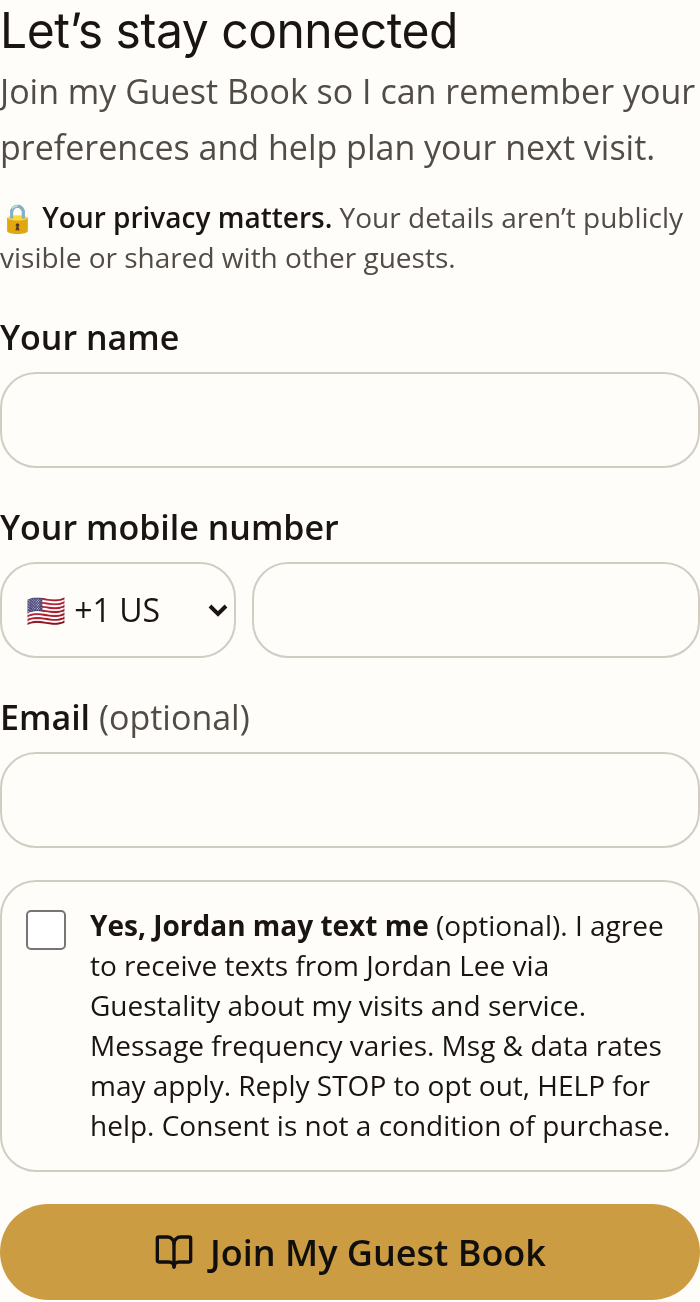
The guest taps Join My Guest Book and enters their name, mobile number and (optionally) email. This sends a request; the professional reviews it before the guest is added.
3. Texting is a separate, optional choice
Below the fields is a checkbox that starts unticked. The guest can join without ticking it. Next to the box it says:
Yes, [Professional first name] may text me
By agreeing, I am opting in to receive texts from [Professional Name] via Guestality about my visits and service. Message frequency varies. Msg & data rates may apply. Reply STOP to opt out, HELP for help. Consent is not a condition of purchase.
Under the button: "[Professional] reviews each request. You can join without ticking the box; [Professional] won't text you unless you tick it and verify your number, or text first." A ticked box takes effect only after the professional accepts the request and the guest verifies the number is theirs, either with a one-time code on the form or by tapping "Verify my number" on a one-time verification link. Verifying never adds new permission; it only confirms the box was ticked by the number's owner. The exact wording and time of each tick are recorded. Links to the Privacy Policy and Terms are shown on the form.
4. Other ways to opt in or out
- A guest can also start the conversation by texting the professional's Guestality number. That lets the professional reply about what the guest asked; it doesn't permit other messages.
- Reply STOP at any time to stop texts, START to resume texts that their own STOP ended, and HELP for help. You can also email info@guestality.co.
- Guestality never texts guests who didn't tick the box and verify their number, or text first. An earlier STOP always wins over a later form submission; only the guest texting START resumes texts.
5. What the texts are about
One-to-one messages from that professional about the guest's visits and reservations: replies to the guest, and visit and reservation details. A professional may start a conversation only with a guest whose ticked box was verified and whose request was accepted, with no opt-out on record. A one-time link to verify the guest's number goes only to guests who ticked the box. No bulk marketing. Mobile numbers and texting consent are never sold or shared with third parties for marketing.